Foundations
The atomic decisions every component inherits — color, type, space, depth and motion. All defined as CSS variables that flip cleanly between dark and light.
Brand color
Yellow is the only chromatic color in the system. It signals interaction; everything else is monochrome.
Yellow & amber
Noir scale
Monogram
The Tollerud mark is a single continuous path — a stylised T in acid yellow (#FFFF00). There is no separate wordmark; use the monogram everywhere the brand needs to appear at small scale.
When to use
| Context | Asset | Notes |
|---|---|---|
| Sidebar, topbar, favicon | <Monogram /> | Primary brand mark — always on noir/black |
| Sign-in panel, auth flows | <Monogram size={26} /> | 26–32px beside product name |
| Hero / marketing | Monogram + wordmark in copy | No separate wordmark file — set product name in Inter next to the mark |
Clear space & background
Preserve at least one T-width of padding on all sides. The monogram is designed for dark surfaces — black, noir-900, or the grain gradient. Never place on white or light backgrounds; contrast breaks and the yellow reads as noise.
import { Monogram } from '@tollerud/ui'

// Default — acid yellow on dark surfaces
<Monogram size={26} />

// Light-mode nav / cards
<Monogram color="black" size={20} />

// On tinted or photo backgrounds
<Monogram color="white" className="h-5 w-auto" />
Navigation lockup
The monogram always appears to the left of the project name — never the name alone, never the mark alone. Use TopNav for top bars so the lockup, link states, focus styles, and spacing stay consistent.
import { Button, TopNav } from '@tollerud/ui'

<TopNav
  projectName="Dashboard"
  navItems={[
    { label: 'Overview', href: '/', active: true },
    {
      label: 'Services',
      // 'items' turns a link into a flyout group — a NavigationMenu
      // trigger on desktop, an accordion in the mobile menu.
      items: [
        { label: 'API', href: '/services/api' },
        { label: 'Worker', href: '/services/worker' },
      ],
    },
    { label: 'Logs', href: '/logs' },
  ]}
  actions={<Button size="sm" variant="primary">Deploy</Button>}
/>import { DashboardShell, PageHeader } from '@tollerud/ui'
<DashboardShell
projectName="Dashboard"
pageTitle="Overview"
sidebarItems={[
{ id: 'overview', label: 'Overview', href: '/', active: true },
{ id: 'services', label: 'Services', href: '/services' },
{ id: 'settings', label: 'Settings', href: '/settings' },
]}
header={<PageHeader title="Overview" description="Fleet health at a glance." />}
>
{/* page content */}
</DashboardShell>State color
Used sparingly for status only — kept muted so yellow stays the loudest thing on screen.
Semantic tokens
CSS variable aliases for background, foreground, card, and accent. Components reference these — re-theming is a matter of remapping nine variables.
| Token | Role | Reference |
|---|---|---|
--background | Page background | var(--background) |
--foreground | Primary text | var(--foreground) |
--card | Raised surface | var(--card) |
--popover | Overlay surface | var(--popover) |
--primary | Yellow action | var(--primary) |
--secondary | Muted surface | var(--secondary) |
--muted | Muted fill | var(--muted) |
--border | Hairline border | var(--border) |
--ring | Focus ring | var(--ring) |
Typography
Inter for display and body, JetBrains Mono for code, metrics and terminal moments. Tight tracking on display sizes.
Display shimmer
Animated yellow sweep clipped to text — for hero accent lines and key metrics on dark surfaces. Ships with the standard @import "@tollerud/ui/globals.css" setup; no extra install step. Use on a short accent span inside .tollerud-display, not body copy. Respects prefers-reduced-motion (static yellow). For a static gradient, use .tollerud-gradient-text instead.
Dark. Monochrome.
Yellow where it counts.
Spacing
A 4px base grid. These eight steps cover the vast majority of layout.
Radius
Subtle by default. Sharp corners hold the noir feel.
Elevation
A four-tier shadow scale plus a yellow glow — theme-aware (deep in dark, soft in light). Lean on borders first; reach for a shadow only to lift overlays (drawers, popovers, menus) off the page.
Density
Two modes: comfortable (default) and compact. Set data-density='compact' on any container, or use density='compact' directly on Card. Live demo → Components.
| Token | Effect |
|---|---|
data-density="comfortable" | Default. Card padding 24px, table rows 48px, form rows relaxed. |
data-density="compact" | Card padding 12px, table rows 36px, panel headers 32px, button heights trimmed. |
<Card density="compact"> | Per-card override — no wrapper needed. |
Motion
Quick and confident. Durations stay short; easing does the expressive work. Primary and terminal buttons get a pointer-following glow when you mount initButtonGlow() once at the app root — see snippet below. Everything respects prefers-reduced-motion.
| Token | Value | Use for |
|---|---|---|
--motion-duration-fast | 150ms | Hover, focus, small toggles |
--motion-duration-normal | 250ms | Most transitions, fades |
--motion-duration-slow | 350ms | Overlays, large movement |
--motion-ease-out | cubic-bezier(.16,1,.3,1) | Entrances |
--motion-ease-in-out | cubic-bezier(.4,0,.2,1) | Movement |
'use client'
import { useEffect } from 'react'
import { initButtonGlow } from '@tollerud/ui'

export function ButtonGlowRoot() {
  useEffect(() => initButtonGlow(), [])
  return null
}

// layout.tsx — mount <ButtonGlowRoot /> once near the body root
Iconography
Docs demos use lucide-react via the Icons registry (24px grid, 1.8 stroke). Yellow is reserved for interactive icons — most sit in the current text color.
// 1. Map a lucide icon in docs-app/components/kit/icons.jsx:
import { Container } from 'lucide-react'
// ...
container: icon(Container),

// 2. Use it anywhere — by component or by name string:
<Icons.container size={18}/>
<StatCard icon="container" .../>   // components that take an icon prop
Voice
Direct. Technical. Warm-but-not-corporate. Think terminal prompt, not marketing email.
❯ deploy --env productionOpen DashboardPort 8080 is in useemma — deployment completeNo alerts — everything looks goodSubmit deployment requestClick here to get startedOops! Something went wrong!Your deployment was successfulThere are no items to displayTia
Tia — Tollerud Infrastructure Agent — is the brand mascot. Cel-shaded monochrome gakuran, amber eyes, gold buttons. A brand signature, not a UI icon. Use sparingly on landing pages, about sections, agent-running moments and loading states.

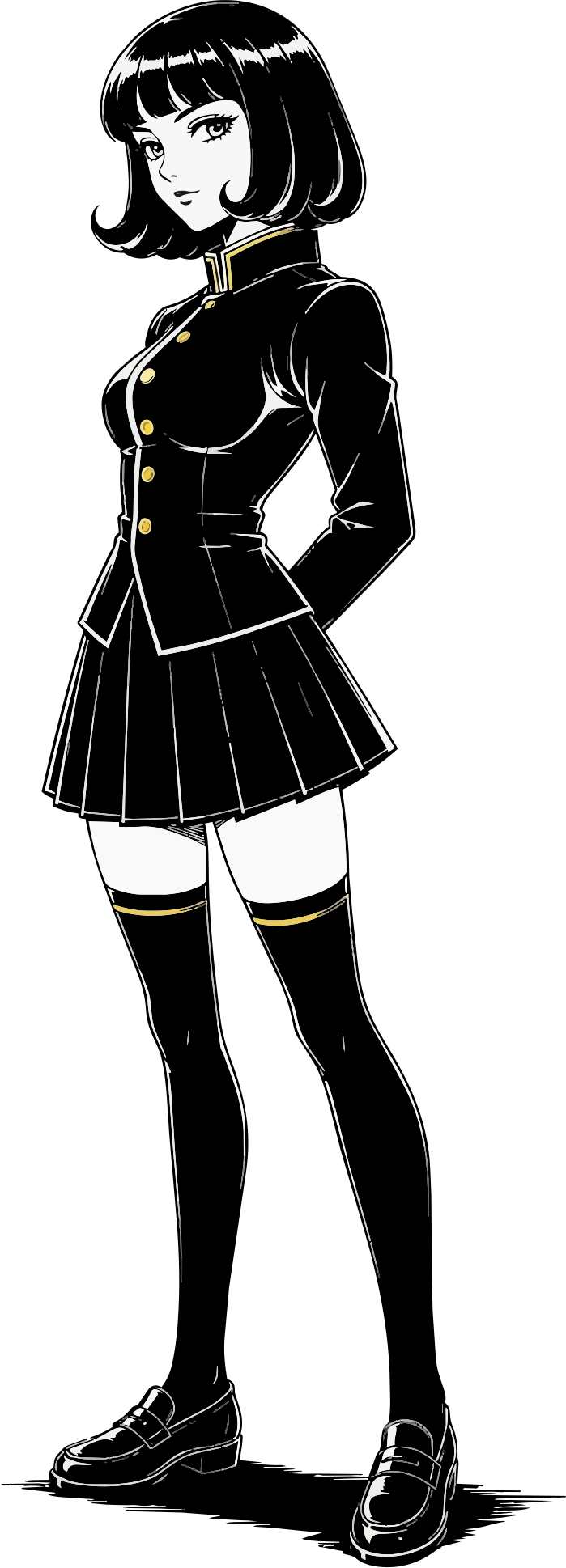
import { TiaPortrait, TollerudAvatarFull } from '@/components/brand'

// Portrait — SVG for crisp scaling, PNG for hero glow
<TiaPortrait width={96} alt="Tia" />
<TiaPortrait variant="png" height={340} glow alt="Tia" />

// Full figure — SVG for docs panels, PNG for hero glow
<TollerudAvatarFull height={480} alt="Tia" />
<TollerudAvatarFull variant="png" height={520} glow alt="Tia" />